
Your freETarget range, run from one screen
Richard Weiser
Rich Weiser is a former competitive shooter, a current rifle coach, and the founder of Falken, Ltd. He organizes the Forbush Falcons Rifle Camp and builds Nexus around what coaches, match directors and families ask for on the range. Based in Winston-Salem, North Carolina.
Follow the authorA freETarget range on match day is a row of targets you built or bought as kits, a laptop on the table behind the firing line, and a match to run. Nexus Desktop is the app for that laptop. It connects to your targets, records every shot, runs the relay from one screen, and hands the results on to everyone who is following along. Today we are taking requests for early access.
Demo dataThe match console during a live relay. Fictional athletes and match.
Before anyone loads
Each freETarget on your range is added once in Nexus Web, by its address on the range network and TCP port 1090. Then install Nexus Desktop on the range computer, Windows or Mac. From that point the targets are the range's business, not the operator's. When a match is scheduled or running, Nexus Desktop connects to every firing point by itself, and a dot on each lane shows that it is talking to its target. If a range also has SIUS or MegaLink lanes, the same computer runs a mix of them.
Build the match where you run it
The Host Match wizard takes four steps and keeps a summary beside them. Choose the rulebook edition in force on the match date and the course of fire, and set Air Rifle to Sporter, Precision, or both in one match. Open entries to anyone or hand out an invite code, set a registration window, and let firing points be assigned automatically. Entry fees, if you charge them, run through Stripe. Enter your own squads and their designated scorers as you go, and Falken drafts a match description from your settings for you to edit. When you finish, the new match opens straight on the console.
Run the relay from one screen
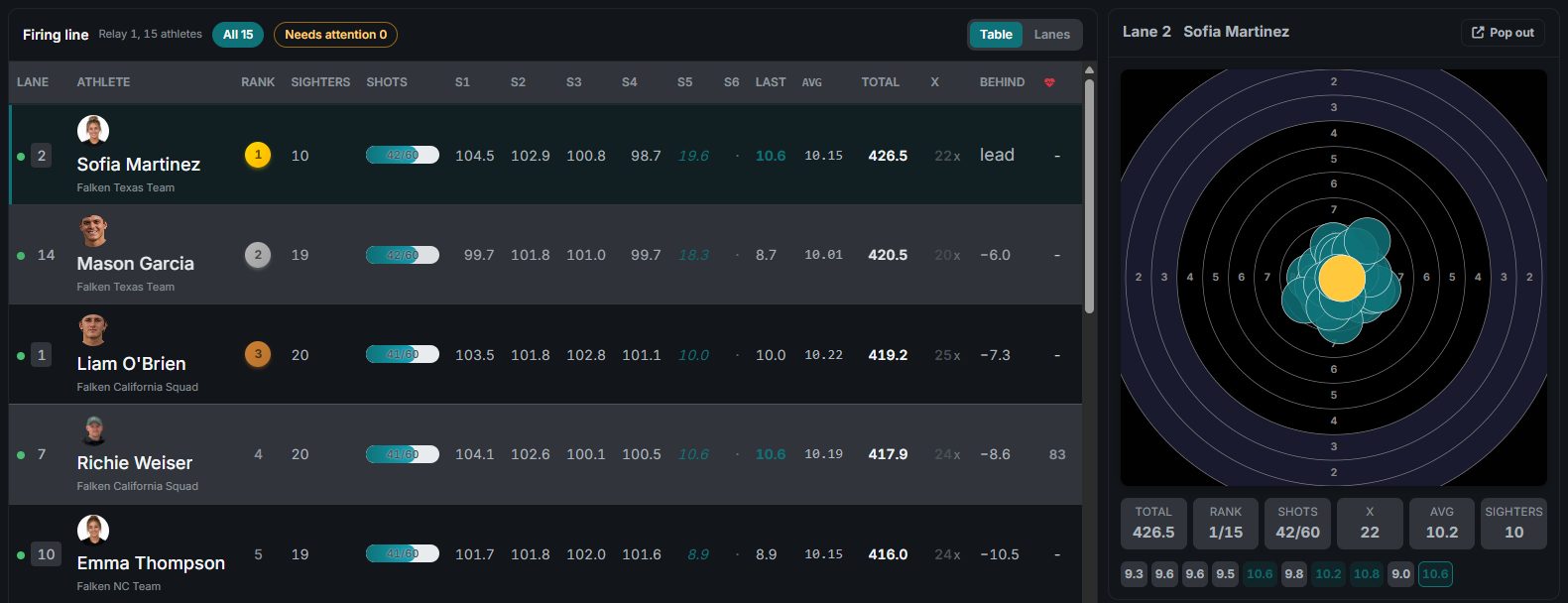
The match console is the operator's seat. The course-of-fire track above the table starts sighters and each stage, and the console asks you to confirm before scored shots begin. Table shows the whole firing line: each athlete ranked within their event as shots arrive, with series totals, sighters, inner tens, and the gap to the leader. Lanes gives each firing point its own tile with its target drawn large. Click a row to bring up that athlete's target, totals, and last ten shots, with the live shot feed underneath.
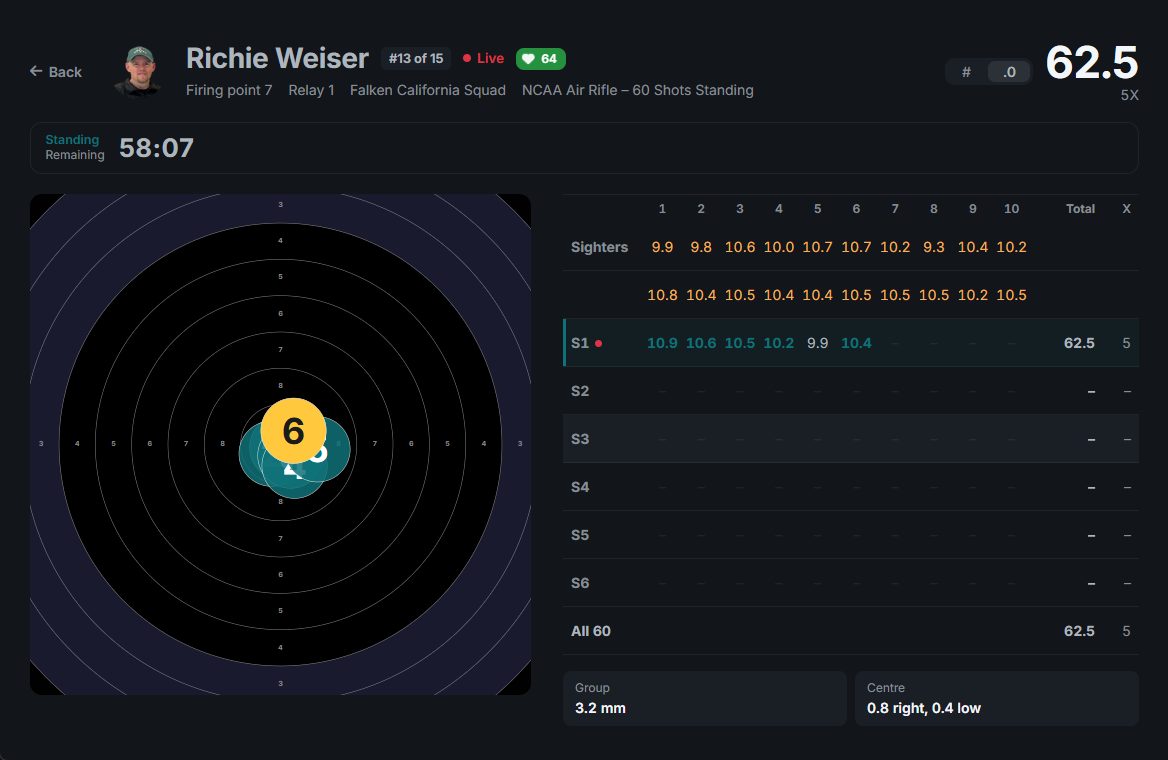
The firing line is not the only place people are watching. The selected lane's target, a spectator scoreboard, the live shot feed, and a lane grid each pop out into their own window, ready for a second monitor or a television behind the line. Run the match from one computer and every other computer on the match follows it. A match director can take control from any of them.
Demo dataOne lane popped out into its own window, for a second screen.
Every shot, saved on the range computer first
Range Wi-Fi is not famous for its reliability, so Nexus Desktop does not depend on it. Each shot from a freETarget reaches the console as it is fired and is saved on the range computer before anything else happens. It files under the right athlete, relay, and stage, with no typing, and with sighters kept out of the score. When the internet drops, the console keeps capturing, counts each unsent shot as waiting to sync, and sends it when the connection returns. If a lane drops, double-click it to reconnect.
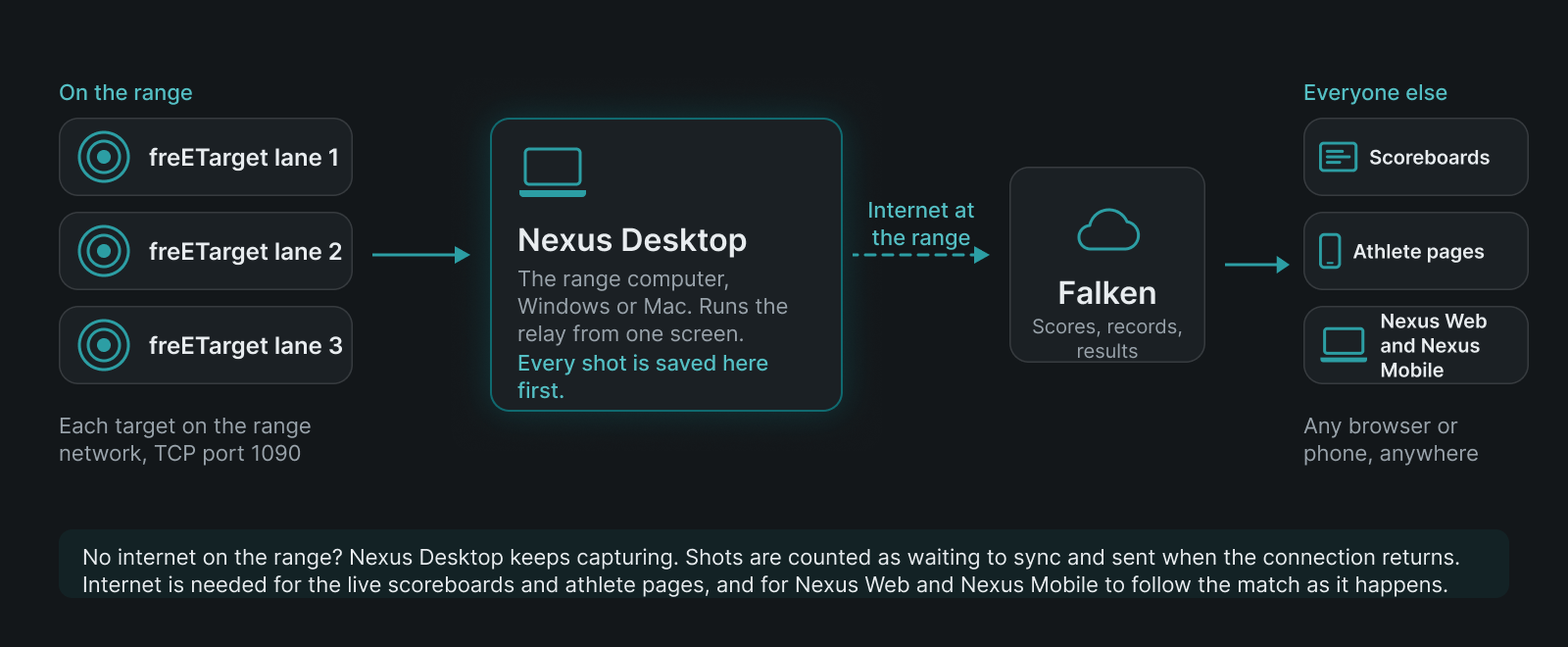
Where each shot goes. The internet link is the one part that needs a connection at the range.
After the last shot
Live Scoring runs in the same app as the firing line, with aggregate or predicted totals, inner tens, and the gap to the leader, ranked within each event. Tick athletes to watch their targets side by side as each shot lands, or open one athlete's card with the series of ten beside the target and the latest shot drawn in gold.
Every score starts provisional. In Score Review you look at flagged shots, apply penalties with the rule and the reason, verify, and finalize. Nexus records who verified each score and when. Results come out as official and team standings in integer or decimal scoring, and export to Excel, an editable Word results book, or a print-ready PDF. Administrators can combine matches already fired into one championship, with standings across the days.
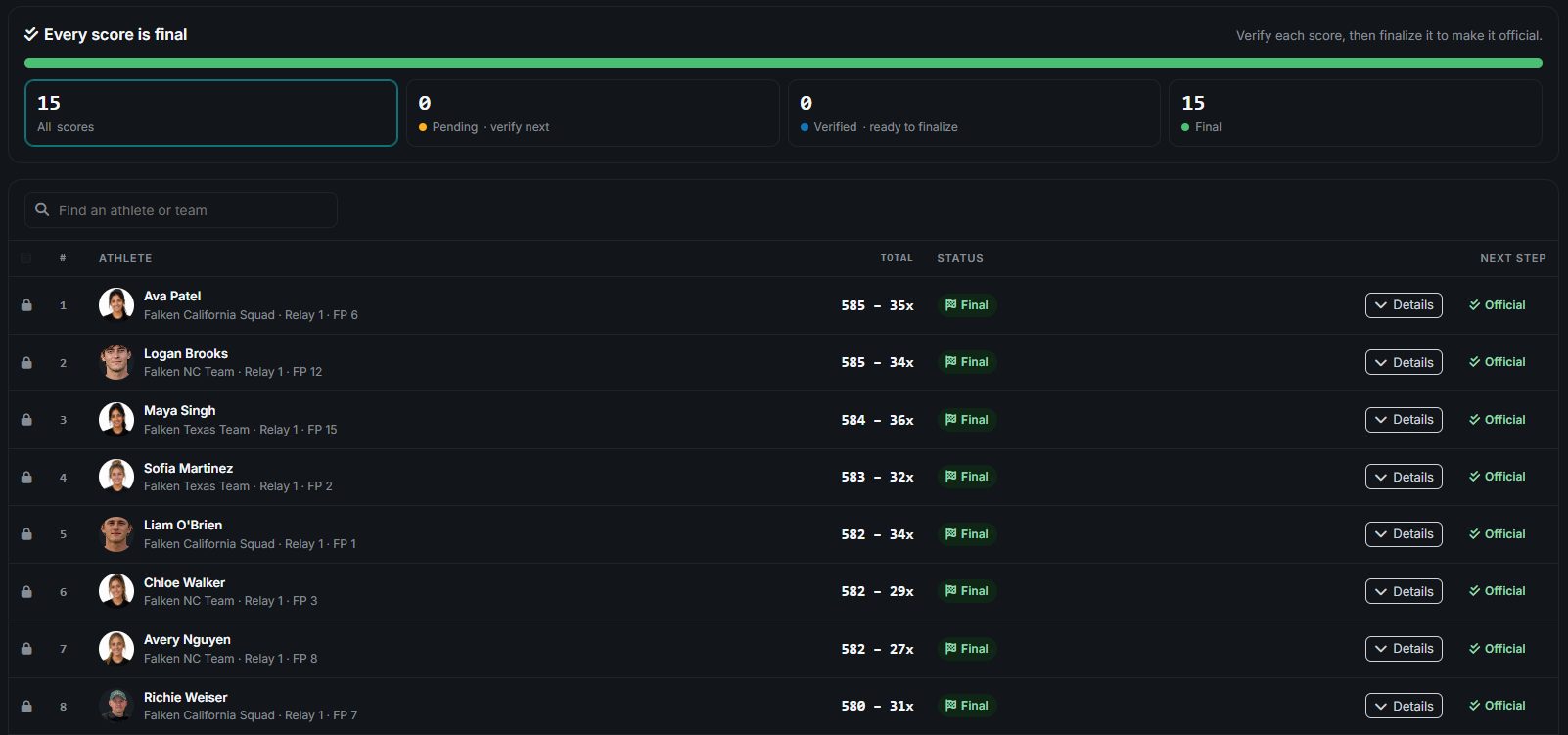
Demo dataScore Review: provisional, verified, final, with who verified each score and when.
The rest of the program, in the same app
Nexus Desktop carries the same roster, calendar, and records as Nexus Web, and most pages keep a copy for reading offline. The coach dashboard shows alerts, roster trends, and each new personal best beside the previous one. Organization records are kept for each course of fire, class, and scoring mode. The practice log takes sessions from the calendar with attendance, the discipline, and the course of fire. Team messages are end-to-end encrypted, with guardians included in chats with minors. Two to six athletes can be compared from the roster in one chart, and two of an athlete's matches can be put side by side. On Windows, it also scores scanned 10 m air rifle cards, for the days a squad shoots paper.
What the range needs
- A Windows 10 computer (version 1809 or later, 64-bit) or a Mac with Apple silicon on macOS 12 or later.
- freETarget targets on the range network, each added once in Nexus Web.
- An internet connection at the range for the live features: the scoreboards and athlete pages that follow each shot, Nexus Web alongside the console, and Nexus Mobile, which is in development for iOS and Android. Without one, the console still captures every shot and syncs when the connection returns.
Signed, and kept current
The Windows and Mac installers are digitally signed, so your computer can confirm they came from Falken before anything runs. When a new version ships, Nexus Desktop offers it inside the app and installs it when you choose, and new versions ship often. The console you set up this month will not be the one you are running by the end of the season, and you will not have to go looking for it.
Early access, by request
freETarget made precise shot detection something a club, a school, or a home range could build. Nexus Desktop is the match software to go with it, and we are starting with the freETarget community. We onboard ranges one at a time: we connect your targets with you, and we help you run your first match.
I think your software is going to change training in the US and worldwide.
Allan Brown, creator of freETarget
If you run a freETarget range and have a match coming up, request early access and tell us about your range. For the full walkthrough of a freETarget match in Nexus, see Nexus for freETarget ranges, and for everything in the app, see Nexus Desktop.
You built the targets. Nexus Desktop runs the match on them.
Steady Hands. Focused Minds. Never Miss.