
Match management and live scoring for JROTC air rifle teams
Nexus, from Falken, Ltd., helps JROTC instructors and rifle coaches run three-position air rifle matches. Set up your unit's roster, build the match and its relays, score every shot live from electronic scoring targets, and publish results that cadets and families can follow from anywhere.
At a glance
- Formats
- 3×10 and 3×20 three-position air rifle
- Classes
- Sporter and precision
- Live scoring
- Fre-E-Target, SIUS, MegaLink
- Range computer
- Nexus Desktop, Windows or Mac
- Everyone else
- Any web browser, phone included
- Availability
- Early access
The terms, briefly
Three-position air rifle (3PAR)
Cadets fire at 10 meters from kneeling, prone and standing. A 3×10 match is ten record shots per position; a 3×20 is twenty.
Sporter and precision
Sporter uses standard sporter air rifles with limited equipment, and is where most cadets start. Precision uses specialized target rifles and shooting clothing.
Electronic scoring targets
Targets that measure where each shot lands and score it instantly, then send the result to a computer on the range.
Match management
Everything around the shooting: entries, relays and firing points, scoring, score review and published results.
How a match runs in Nexus
From roster to results, in one system.
Set up your unit
Create your program as an Army, Navy, Marine Corps, Air Force or Space Force JROTC unit, add cadets with their class years, and group them into teams.
Build the match
Choose a 3×10 or 3×20 course of fire, set each event as sporter or precision, take entries, and assign cadets to relays and firing points.
Score it live
On electronic scoring targets, Nexus Desktop on the range computer records each shot as it's fired and sends it to Falken's servers.
Review the scores
Every score starts provisional. You verify it, apply penalties where the rules call for them, and mark results final.
Publish individual and team results
Standings by position, by class and by team, on public pages you can share with your school and families.
Keep every cadet's history
Each match lands in the cadet's record, next to training journals and goals, and follows them from season to season.
What families see
Share one link and parents can follow the match on their phones: live standings, and each cadet's shots landing on the target. No app and no login for public matches.
This is the same view shown on the homepage. Live viewing needs electronic scoring targets; private matches stay behind a login.
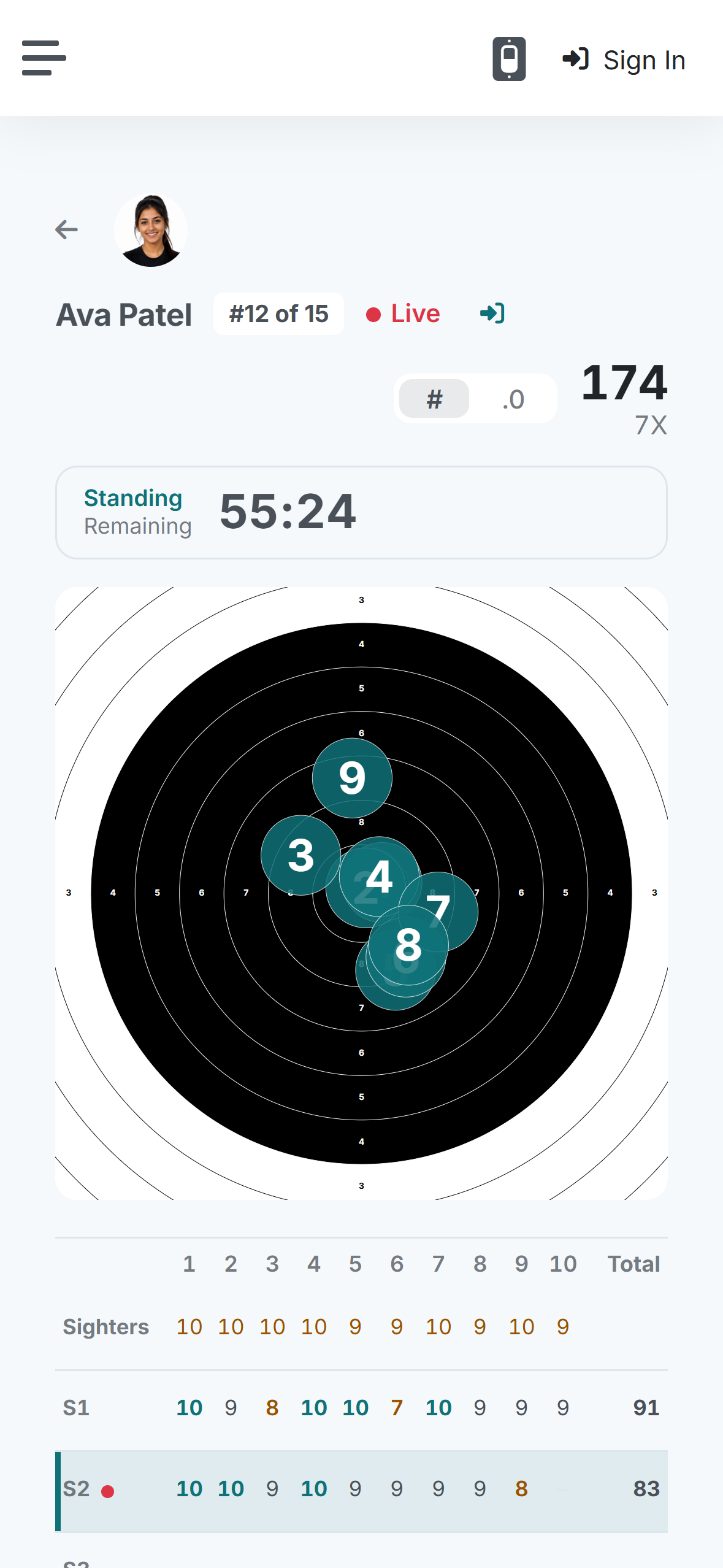
Demo dataFictional athlete and match: the public athlete page in iPhone Safari during a live match.
The same series as text
| Shot | 1 | 2 | 3 | 4 | 5 | 6 | 7 | 8 | 9 | Total |
|---|---|---|---|---|---|---|---|---|---|---|
| Decimal | 10.4 | 10.8 | 9.3 | 10.4 | 9.1 | 9.2 | 9.2 | 9.4 | 8.3 | 86.1 |
| Integer | 10 | 10 | 9 | 10 | 9 | 9 | 9 | 9 | 8 | 83 |
| Inner ten | Yes | Yes | Yes | 3 |
What you need
- For live scoring: electronic scoring targets from Fre-E-Target, SIUS or MegaLink on your range network.
- A Windows or Mac computer on the range running Nexus Desktop.
- An internet connection at the range to publish shots live.
- Everyone else, from instructors to cadets to parents, uses a web browser. Nothing to install.
Good to know
- Live, shot-by-shot viewing needs electronic scoring targets.
- Falken runs and scores your match. It does not sanction matches or file official results with a governing body.
- Scores are provisional until you verify them.
- Falken is in early access. We onboard programs one at a time and set your unit up with you.
Equipment compatibility reviewed October 2026.
Questions JROTC instructors ask
Can Nexus run a JROTC three-position air rifle match?
Which electronic scoring targets work with Nexus?
Can parents watch without an account?
Does Falken sanction matches or submit official results?
Can we bring in results we scored elsewhere?
What does it cost?
How do we get started?
Bring Nexus to your JROTC rifle team
Falken is in early access. Tell us about your unit and your next match.
Falken is in early access
Rifle programs are onboarding now. Leave your details and we'll be in touch about bringing your team on.
Running a match soon? Tell us about your program